Advanced LFQL Grammar
LFQL grammar is similar to SQL grammar. This guide presents ordinary-language descriptions of the grammar in conjunction with railroad diagrams and formal statements in Backus-Naur form. If you are looking for a formal summary, you can focus on the Backus-Naur statements.
Reading Railroad Diagrams
Each railroad diagram is a representation of the Backus-Naur statement that it is paired with. The railroad diagram should be read following the path of the lines, going from left to right. Alternative paths to get from left to right represent alternative ways of forming a grammatical query. The ►►─── symbol indicates the beginning of the diagram, and the ───►◄ symbol indicates the end of the diagram.
The railroad tracks may allow for the repetition of certain elements, or for a choice between different paths that have the same starting and ending points. Both these cases appear as loop-like structures, but in the former case, the tracks diverge and converge in a way that allows a “train” to travel in a loop indefinitely, while in the latter, a “train” that chose one path over another cannot turn back onto the other path. Visually, a repetition loop looks like this:
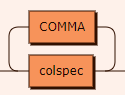
Imagine a train coming from the left, taking a “left turn” after colspec, then picking up another COMMA and another colspec, and so on indefinitely. In contrast, an option to take a different path without repetition looks like this:
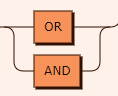
Here, a train at the start of the diagram (the top leftmost corner) would have to choose either the OR or the AND path. Once it comes back out of the other side, the way the tracks converge makes it impossible for the train to “turn around” onto the path that it had avoided. Instead, the train has no choice but to go on “ahead” (towards the right edge of the diagram).
In Backus-Naur statements, a question mark ? at the end of a term or statement indicates that that term or statement is optional, while * indicates an option to repeat a phrase within a clause indefinitely. For example, it is optional to use an AS when specifying an alias, and you can specify as many tables as you want in a FROM clause.
stmt: Main Statement
Every query takes the form of this statement. colspec represents the column being selected for output, and forms part of the mandatory SELECT clause. fclause_opt represents the optional FROM clause that specifies the tables being selected from. wclause is the WHERE clause, which specifies the conditions that the rows in the result set must meet. oclause_opt is the optional ORDER BY clause, used to sort the results. Each of these clauses is described briefly in the introduction to constructing a LFQL query.

stmt ::= SELECT colspec ( COMMA colspec )* fclause_opt WHERE wclause oclause_opt
stmt is not referenced by anything.
Notice the loop that COMMA is in. A loop like this means that multiple colspecs, separated by COMMAs, can be specified, depending on how many times the loop is traversed counter-clockwise. For example, SELECT → colspec → COMMA → colspec → COMMA → colspec → fclause_opt → WHERE → wclause → oclause_opt would be a possible path.
colspec: SELECT Statement
As indicated above, you can specify as many columns as you want as long as there is a comma between any two columns. You can also specify an AS option within the column specification, which lets you assign aliases (or correlation names) to the columns. Aliases make it easier to refer to the columns in later clauses, such as when filtering the results by a function on the columns. The alias you assign must satisfy certain rules—see the rules for identifiers on what can count as an IDENT. The question mark at the end of the statement indicates that this clause is optional.
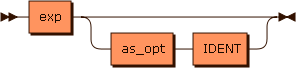
colspec ::= exp ( as_opt IDENT )?
Referenced by: stmt
fclause_opt: FROM Statement
The FROM clause specifies the tables from which to obtain results. As with specifying columns, the diagram shows that you can specify as many tables as you want, as long as each table (represented by fromspec) is separated from the next table by a COMMA. Specifying no tables is an option. This option is represented by the bottommost path, which is empty. The LF.Entry table will be queried if no tables are specified.
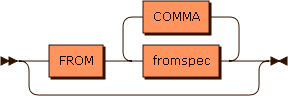
fclause_opt
         ::= ( FROM fromspec ( COMMA fromspec )* )?
Referenced by: stmt
fromspec: Tables Specified
If you choose not to assign correlation names (aliases) to tables, take the top railroad track of this diagram, which is empty. The bottom track gives you the option to assign aliases to tables, the same way you can assign aliases to columns. These aliases can then be used in other clauses to filter the results. The left IDENT is the table’s original name, and the right IDENT is your chosen alias for the table. See the rules for identifiers on what can count as an IDENT.
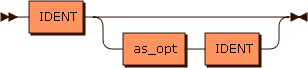
fromspec ::= IDENT ( as_opt IDENT )?
Referenced by: fclause_opt
as_opt: Aliases or Correlation Names
The empty top railroad track indicates that this option can be skipped: you do not have to include an AS before your alias. The table of sample queries includes examples that use AS and examples that do not.

as_opt ::= AS?
Referenced by: colspec, fromspec
wclause: The WHERE Clause
This is the most complicated clause, as it lets you specify conditions that the returned results must satisfy. These conditions can be based on propositional logic, pattern-matching of strings, a full-text search, or comparing ordered quantities (numbers, dates, and times). Conditions of different types can be combined using the propositional logic operators.
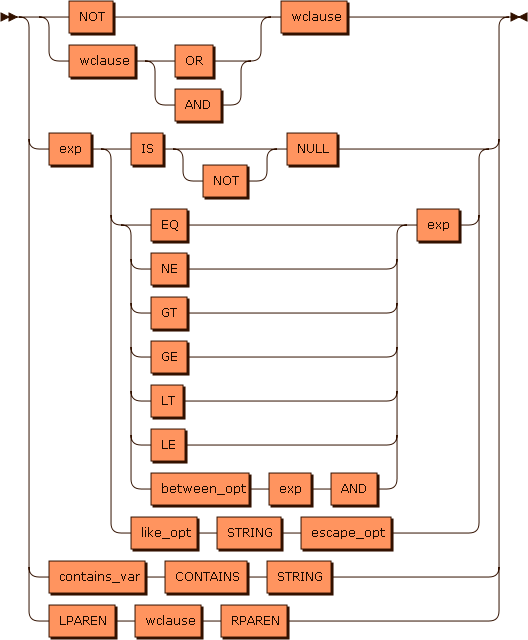
wclause  ::= ( NOT | wclause ( OR | AND ) ) wclause
           | exp ( IS NOT? NULL | ( EQ | NE | GT | GE | LT | LE | between_opt exp AND ) exp | like_opt STRING escape_opt )
           | contains_var CONTAINS STRING
           | LPAREN wclause RPAREN
Referenced by: stmt, wclause
like_opt: Pattern-Matching by Similarity
This clause lets you obtain results containing string patterns. The table of sample queries includes examples using the LIKE operator.
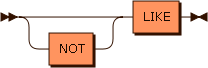
like_opt ::= NOT? LIKE
Referenced by: wclause
escape_opt: Escaping Special Characters
If you are using a LIKE clause to look for a string pattern, you may need to escape special characters like ', which are part of the LFQL syntax. To include ' within your search strings, add an additional '. Two consecutive ' characters are treated as a single ' character within the search string. However, if you want to escape other characters like ‘%’, you may need to specify a custom escape character, which is where escape_opt comes in. For example, to filter for results containing ‘%’, specify the escape character ‘' as follows:
SELECT column FROM table
 WHERE column LIKE '%\%%' ESCAPE '\'

escape_opt
         ::= ( ESCAPE STRING )?
Referenced by: wclause
between_opt: Restricting Results Based on Range of Values
You can filter the results you get by demanding that certain column values in their rows be within a range of values. This can apply to numbers or to other ordered quantities like dates and times.
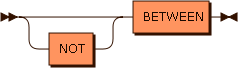
between_opt
         ::= NOT? BETWEEN
Referenced by: wclause
contains_var: Full Text Search
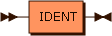
The branch of the diagram with contains_var represents the grammar of a full-text search. IDENT would be the type of object (file name, tag comments, etc.) within which you are looking for the string of interest.
contains_var
         ::= IDENT
Referenced by: wclause
exp: Expressions
As shown above, the WHERE clause lets you restrict your results based on whether they satisfy certain conditions, which are made up of expressions connected by logical, arithmetical, or string manipulation operators. exp shows the substructure of expressions. Expressions can be made up of smaller expressions combined by another set of arithmetical and string operators. DBLPIPE refers to the || operator, which concatenates strings the same way it does in SQL. The IDENT → LPAREN → explist_opt → RPAREN path represents the situation where you use a built-in function as an expression.
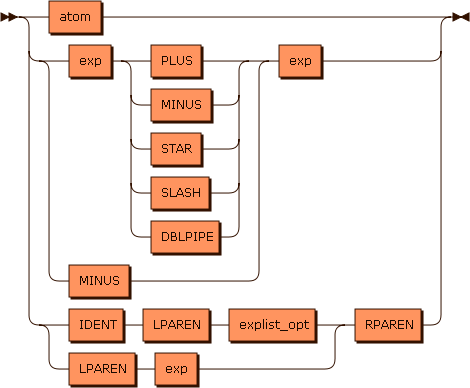
exp      ::= atom
           | ( exp ( PLUS | MINUS | STAR | SLASH | DBLPIPE ) | MINUS ) exp
           | ( IDENT LPAREN explist_opt | LPAREN exp ) RPAREN
Referenced by: colspec, exp, explist_opt, wclause
explist_opt: Arguments in Built-In Functions
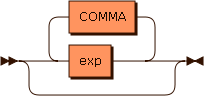
explist_opt represents the arguments that go into built-in functions. It allows as many arguments as you need by always letting you put a comma at the end of the present arguments and add a new argument.
explist_opt
         ::= ( exp ( COMMA exp )* )?
Referenced by: exp
atom: Basic Objects in Expressions
The atom type encompasses fixed objects that can be directly compared with other expressions. Examples would be the integer 37 and the string “fixedstring”.
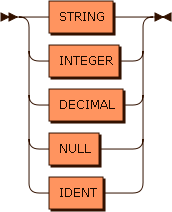
atom     ::= STRING
           | INTEGER
           | DECIMAL
           | NULL
           | IDENT
Referenced by: exp
oclause_opt: ORDER BY Clause
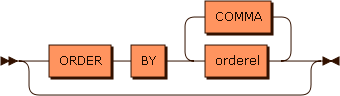
After the WHERE clause, you can order your query results according to multiple criteria. Each criterion is represented by one instance of orderel.
oclause_opt
         ::= ( ORDER BY orderel ( COMMA orderel )* )?
Referenced by: stmt
orderel: Ordering Criteria
Ordering criteria can be based on the values of integers or on alphabetical order (IDENT represents identifying strings that start with a letter or an underscore).
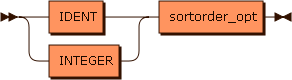
orderel ::= ( IDENT | INTEGER ) sortorder_opt
Referenced by: oclause_opt
sortorder_opt: Ascending or Descending Order
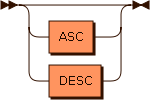
For each ordering criterion, you can choose it to sort the results in ascending (ASC) or descending (DESC) order. If no option is selected, the results will be sorted in ascending order.
sortorder_opt
         ::= ( ASC | DESC )?
Referenced by: orderel
Operator Precedence
Here is the operator precedence ordering, from highest to lowest. Operators on the same line have equal precedence.
(,)-(unary)*,/+,-(binary)=,<>,<,>,<=,>=NOTANDOR
The *, /, - (binary), +, AND, and OR operators associate from left to right. The - (unary) and NOT operators associate from right to left. All other operators are non-associative.
Rules for Basic Elements
<IDENT> follows the rules for identifiers:
- Contains letters, numbers, or the underscore
- Starts with a letter or underscore
- From 1 to 127 characters long
- Can be quoted with double-quotes, in which case a pair of double-quote characters is interpreted as a single double-quote
- Can have multiple segments separated by a dot; each segment follows the above rules
<STRING> is a literal string quoted with the ' character. A pair of ' characters embedded in a string is treated as a single ' character.
<NUMBER> includes integers and decimal numbers. Numbers have the following formats specified with regular expressions:
- Decimal integers:
[-+]?[1-9][0-9]* - Octal integers:
[-+]?0[0-7]* - Hexadecimal integers:
[-+]?0[Xx][0-9a-fA-F]+ - Decimals with a fractional portion:
[-+]?[0-9]*\.[0-9]+([Ee][-+]?[0-9]+)?
<DATE> is a date with an optional time value. A <DATE> literal consists of the keyword DATE followed by a literal string containing a date and optional time in ISO-8601 format. For example: DATE '2007-10-22 4:45:00'. See the list of search examples for sample date queries.
<TIME> is a time of day value. A <TIME> literal consists of the keyword TIME followed by a literal string specifying a time of day.